Πώς να Χρησιμοποιήσετε CI/CD για να Βελτιώσετε το Workflow σας
- Stylianos Asmargianakis
- Dev ops
- 3 Αυγούστου 2025
Table of Contents
Στον σημερινό γρήγορο κόσμο του development, τα χειροκίνητα deployments δεν είναι μόνο χρονοβόρα αλλά και επιρρεπή σε λάθη. Είτε είστε freelancer, μικρό agency, ή διαχειρίζεστε εσωτερικά εργαλεία, το CI/CD (Continuous Integration & Deployment) μπορεί να βελτιώσει δραματικά το πώς χτίζετε, δοκιμάζετε και κυκλοφορείτε λογισμικό.
Σε αυτό το post, θα αναλύσουμε:
- Τι είναι το CI/CD και γιατί έχει σημασία
- Τα κύρια οφέλη
- Ένα παράδειγμα setup στην πράξη χρησιμοποιώντας Hugo και Decap CMS με GitLab CI
🚀 Τι Είναι το CI/CD;
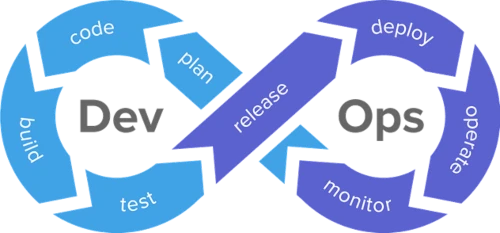
Το CI/CD είναι ένα σύνολο πρακτικών που αυτοματοποιούν τη διαδικασία:
- Ενσωμάτωσης αλλαγών κώδικα σε ένα κοινό repository (CI)
- Αυτόματης ανάπτυξης ενημερώσεων σε production ή staging περιβάλλοντα (CD)
Μόλις ρυθμιστεί, κάθε φορά που κάνετε push στο Git repo σας:
- Το site/app σας ξαναχτίζεται
- Τρέχουν tests ή έλεγχοι formatting (αν έχουν ρυθμιστεί)
- Το αποτέλεσμα αναπτύσσεται στον server ή στο CDN σας
💡 Γιατί να Χρησιμοποιήσετε CI/CD;
Ορίστε τα κύρια οφέλη:
- 🕒 Εξοικονόμηση χρόνου: Τέλος τα χειροκίνητα uploads FTP ή deployments μέσω SSH
- 🛡️ Συνέπεια: Τα builds είναι αναπαραγώγιμα και version-controlled
- 🔄 Έτοιμα για rollback: Εύκολη επαναφορά σε προηγούμενες λειτουργικές καταστάσεις
- ⚙️ Αυτοματοποιημένα workflows: Από linting έως πλήρη regeneration και deployment του site
- 🤝 Φιλικό για ομάδες: Οποιοδήποτε μέλος της ομάδας μπορεί να κάνει push και να ενεργοποιήσει deployments χωρίς πρόσβαση στο production
🧪 Ένα Πραγματικό Παράδειγμα: Hugo + Decap CMS + GitLab CI
Ας πούμε ότι χτίζετε ένα γρήγορο static site με Hugo, και διαχειρίζεστε το περιεχόμενο με το Decap CMS (το οποίο κάνει commit τις αλλαγές περιεχομένου απευθείας στο Git repo σας).
Ορίστε πώς μπορεί να μοιάζει ένα πλήρως αυτοματοποιημένο CI/CD pipeline.
Δομή φακέλων:
your-hugo-site/
├── content/
├── layouts/
├── static/
├── .gitlab-ci.yml
├── config.toml
└── ...
Αρχείο GitLab CI (.gitlab-ci.yml):
image: klakegg/hugo:ext-alpine

stages:
  - build
  - deploy

build_site:
  stage: build
  script:
    - hugo --minify
  artifacts:
    paths:
      - public

deploy:
  stage: deploy
  only:
    - main
  script:
    - rsync -avz public/ user@server:/var/www/your-site/
✅ Μπορείτε να αντικαταστήσετε το deploy script με scp, sftp, ή ακόμη και εντολές Docker αν χρησιμοποιείτε containerized hosting όπως η Guru-host.
🛠️ Ενσωμάτωση Decap CMS
Με το Decap CMS, οι αλλαγές περιεχομένου σας γίνονται commit πίσω στο Git repository αυτόματα (συνήθως κάτω από το content/).
Έτσι κάθε φορά που ενημερώνετε ένα post μέσω του admin panel του Decap:
Γίνεται ένα commit στο main branch Το GitLab CI ενεργοποιείται Το Hugo ξαναχτίζει το site Το site σας αναπτύσσεται ξανά αυτόματα
💥 Δεν απαιτείται καμία παρέμβαση developer — ακόμα και μη τεχνικοί editors μπορούν να δημοσιεύσουν με σιγουριά.
📦 Containerizing το Workflow (Προαιρετικό)
Μπορείτε επίσης να πακετάρετε ολόκληρη τη διαδικασία build + deploy σε ένα Docker container, επιτρέποντάς μας (ή σε εσάς) να το φιλοξενήσουμε σε πρόγραμμα, ή να ενεργοποιήσουμε deployments μέσω webhooks.
Χρειάζεστε βοήθεια; Στην Guru-host, ειδικευόμαστε στη δημιουργία φορητών, Docker-based λύσεων Hugo+CI/CD.
✅ Τελικές Σκέψεις
Το CI/CD δεν είναι πια πολυτέλεια — είναι απαραίτητο για τη σύγχρονη παράδοση λογισμικού και sites.
Η χρήση CI/CD με Hugo και Decap CMS κάνει τα workflows περιεχομένου όχι μόνο απρόσκοπτα αλλά πλήρως αυτοματοποιημένα. Είτε τρέχετε ένα προσωπικό blog, ένα εταιρικό site, ή ένα κυβερνητικό project — αυτό το setup:
Εξοικονομεί χρόνο Ελαχιστοποιεί τα λάθη Επιτρέπει scalability
👉 Χρειάζεστε βοήθεια για να υλοποιήσετε CI/CD στο project σας; Επικοινωνήστε μαζί μας και θα σας βοηθήσουμε να το στήσετε — με ή χωρίς να το φιλοξενήσουμε στη δική μας υποδομή.